
The audit
What the audit covers
Six detection types, sized and prioritised by a senior Azure architect, then reviewed with your team.
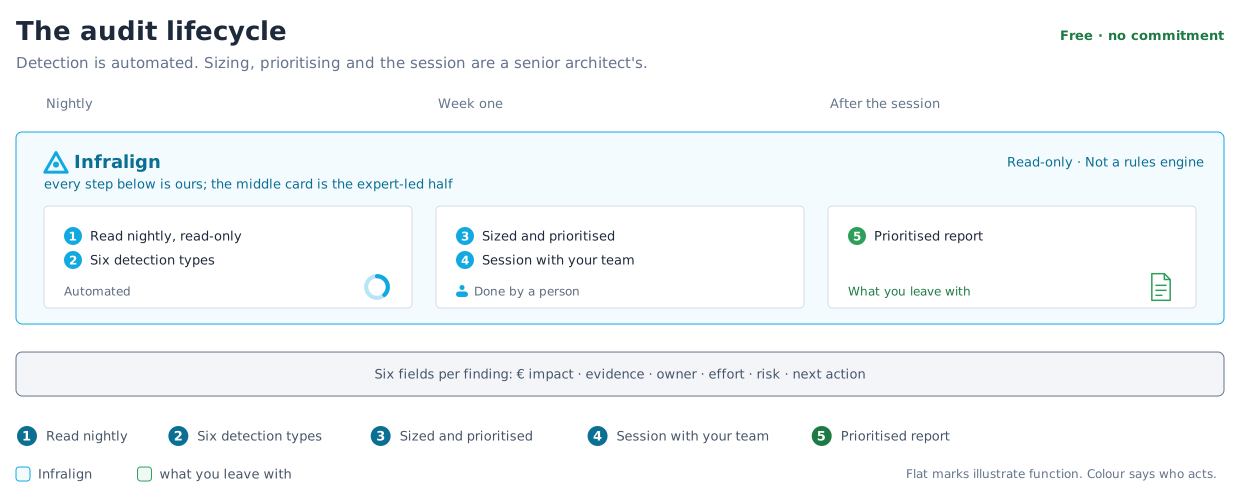
The audit combines a working session with a written report of Azure savings opportunities. Every finding carries six decision fields.
Audit sequence
Section titled “Audit sequence”| Step | Owner | Observable outcome |
|---|---|---|
| 1. Read the sources nightly | Infralign | The Data Ops dashboard shows current source dates. |
| 2. Detect six finding types | Infralign | Candidate findings carry evidence from your estate. |
| 3. Size and prioritise | Senior Azure architect | Each candidate has an impact estimate and priority. |
| 4. Review the candidates | Your team and the architect | Each finding has an owner and agreed next action. |
| 5. Finalise the report | Infralign | You receive the prioritised written report. |
What the audit surfaces
Section titled “What the audit surfaces”Step 2 of figure 1 covers six detection types.
| Category | Signal | Threshold | € basis |
|---|---|---|---|
| Idle VMs | 30-day rolling p95 CPU, with an idle-day count | p95 CPU under 5% | The spend the idle VMs carry |
| Rightsizing | 30-day p95 CPU utilisation, with a confidence level per candidate | None | The saving on each shutdown or resize candidate |
| Reservations and Savings Plans | Commitment coverage per pool | 60% coverage target | Eligible spend not covered by a commitment |
| Orphaned disks | Managed disks with no attached VM, still billing | None | What those disks still charge |
| Log optimisation | Over-provisioned logging and retention that can be trimmed without losing signal | None | The logging spend the trim releases |
| Azure Hybrid Benefit (AHB) licensing | Eligible Windows and SQL workloads not yet claiming the benefit | None | The licensing saving the benefit delivers |
How the evidence is built
Section titled “How the evidence is built”A rightsizing finding based only on billing data is a guess. The audit combines Advisor with three operational signals:
- 30-day p95 CPU from Azure Monitor
- idle-day counts
- inventory from Azure Resource Graph
An architect checks each candidate against actual spend, architecture, and policy. Advisor is an input, not the output.
That review is step 3 in figure 1.
What you need to provide
Section titled “What you need to provide”- Keep Azure connected through both required roles.
- Bring the owners of your largest cost lines to the working session.
Done when each prioritised finding has an owner and next action.
Clean tags are not required: billing and resource metadata are enough, and extra context improves ownership attribution.
What the audit is not
Section titled “What the audit is not”The audit is not a penetration test, general architecture review, or compliance assessment. It is a cost audit with architecture context.