

Reference
Permissions
Two built-in Azure roles, at a scope you pick, and what neither of them can do.
Infralign’s Cost API lane runs on exactly two read-only roles, both Azure built-ins, granted at management group scope or per subscription.
On the default path the two roles are assigned to the Infralign enterprise application, the same Microsoft-verified application your tenant admin-consents to for sign-in. Its consent covers sign-in only. The two role assignments are the entirety of the data access, and removing them revokes it. You create no app registration and handle no client secret.
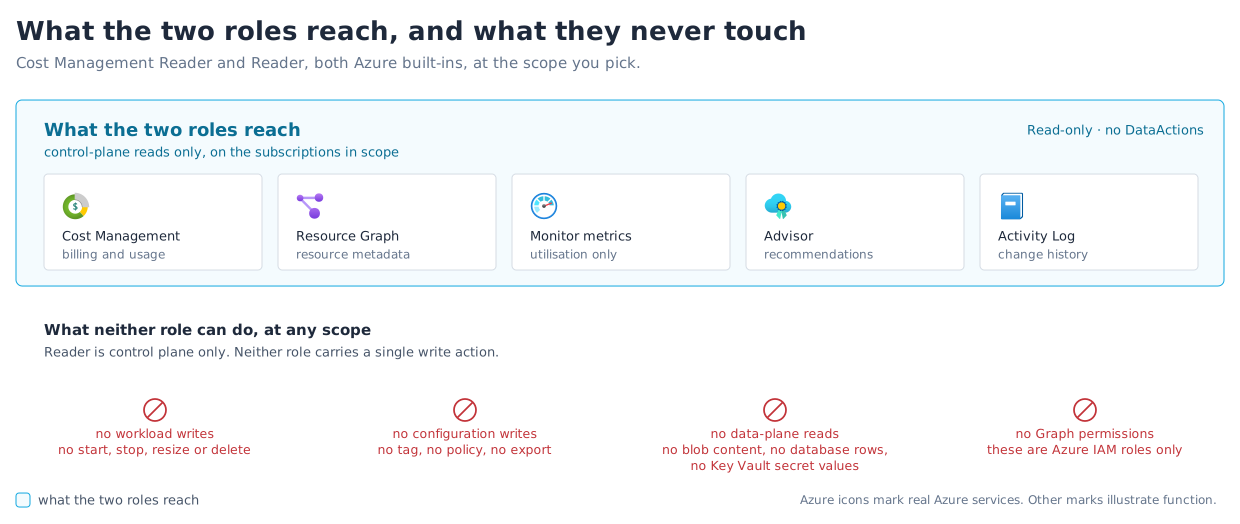
The roles are read-only: neither can create, modify, or delete anything in your Azure estate. No Owner or Contributor role is needed, at any scope or stage. That includes engagements, where the architect prepares each change and your team merges it through your own pipeline. Figure 1 draws that boundary: what the two roles reach, and what they never touch.
For the residency, contractual and certification picture, see Security at Infralign.
Azure roles
Section titled “Azure roles”| Role | Scope | Covered operations | Why it’s needed |
|---|---|---|---|
| Cost Management Reader | The management group covering your estate, or each subscription you include | Microsoft.CostManagement/generateCostDetailsReport (an action) and the cost query used to validate it | The daily cost report is a POST action, not a read: plain Reader returns 403 on it. Report blobs download over Cost-Management-signed SAS links, so no storage role is involved. |
| Reader | The management group covering your estate, or each subscription you include | */read: Resource Graph inventory, Activity Log, Monitor metrics, Advisor recommendations | Resource metadata, change history, CPU utilisation, and Advisor signals. Never data inside resources. |
Roles and scope are this page. The endpoint-level view, naming each API, its api-version, and what breaks without it, lives in data sources and is maintained only there.
Granting either role needs Microsoft.Authorization/roleAssignments/write at the scope you choose, which means Owner or User Access Administrator there. That is a different permission from the one that grants admin consent, and holding one does not imply the other; on the classic path it is also different from the permission that registers applications.
How the roles get assigned. For one or two subscriptions, use Access control (IAM) → Add role assignment in the portal, with the Infralign enterprise application as the assignee.
For more, the wizard’s Roles step generates an idempotent Cloud Shell script, in Bash or PowerShell, that assigns both roles across every subscription in one run. It is safe to re-run and skips assignments that already exist. The same step offers a Resource Graph deep link, which opens Resource Graph Explorer in your own portal and runs the inventory query the roles expose. You read exactly what Infralign can see before validation runs.
The wizard then checks both roles on every subscription, matched against the assignee’s own service principal rather than any principal holding the roles, before it stores anything. The equivalent az CLI runbook is there for a change record.
Scope minimisation
Section titled “Scope minimisation”The scope is yours to choose. Neither role grants any write permission at either scope, and Cost Management Reader sits below the billing account in both cases.
Management group scope is the recommendation: one assignment per role on the management group covering your estate, rather than two per subscription. Twenty subscriptions is two assignments instead of forty, and a subscription created later inherits both, so a new subscription needs no portal work. The setup wizard’s Roles step, the classic Entra app registration walkthrough and the validation check all assume it. The check reads role assignments with $filter=atScope(), which returns management-group-inherited assignments. An inherited grant therefore validates exactly like a direct one.
Per-subscription assignment is the alternative where you do not administer a management group, or where you want the assignment list itself to be the record of which subscriptions are in scope. Start with one and add others when you’re ready.
Neither choice changes what Infralign processes. That is the subscription list you tick in the wizard’s Scope step, and it is independent of where the roles were granted. A management-group assignment does not add a subscription to your scope on its own.
Scope is the simpler lever than a custom role. You choose where the two roles are assigned, and independently which subscriptions you tick in the wizard’s Scope step. A sensitive subscription can be left out entirely.
What these roles cannot do
Section titled “What these roles cannot do”- Neither role can create, modify, or delete anything in your Azure estate: no resource, no configuration, no tag, no export.
- Reader exposes control-plane metadata only and has no
DataActions: it cannot read database rows, blob contents, VM disks, application data, or Key Vault secret values. - The data access itself needs no Microsoft Graph API permissions, only these IAM role assignments. On the default path the assignee happens to be the Infralign application your tenant granted a one-time sign-in consent to, but that consent grants no Azure data access: the two role assignments are what grant it, and removing them revokes it. On the classic path the
infralign-readerservice principal carries no Graph permissions and no consent at all. See Dashboard sign-in for what the consent contains. - No agents or extensions are installed on your VMs, and no standing production privilege exists. See the safety model.
Why Reader, and what it cannot see
Section titled “Why Reader, and what it cannot see”Security teams reasonably ask whether Reader is too broad.
Reader’s */read is control plane only: resource existence, SKUs, tags, and configuration metadata. It has no DataActions, so it cannot read data planes: no blob contents, Key Vault secret values, database rows, or VM disks. It also cannot call action-style operations such as listKeys. Control-plane metadata can still contain sensitive names, tags, and configuration, so review its scope as customer data.
Log Analytics is the exception. Query results come back from Microsoft.OperationalInsights/workspaces/query/read, a control-plane read, so Reader can reach log content. Infralign does not query Log Analytics: the nightly run reads Cost Management, Resource Graph, Advisor, and Azure Monitor metrics (Microsoft.Insights/metrics) only. Monitor metrics and Monitor logs are different providers. If your workspaces carry logs you treat as sensitive, assign the roles at a scope that excludes them.
Infralign asks for that breadth because of Azure Resource Graph’s authorisation model: Microsoft.ResourceGraph/resources/read alone returns only the resources the identity can already read individually. A narrower role does not make queries fail. It makes resources silently vanish from inventory, so a blind spot reads as “no waste found” rather than “access denied”. A complete custom role therefore converges back towards */read, which is Reader. (Monitoring Reader is not a narrower alternative: its definition also includes */read.)
Optional: Microsoft Teams
Section titled “Optional: Microsoft Teams”| Integration | Access | Why it’s needed |
|---|---|---|
| Microsoft Teams | Incoming webhook to a channel | Lets Infralign post the monthly summary and cost alerts into a channel you nominate. |
Teams is optional. The visibility tier and the audit work from the Azure roles alone. The webhook posts into your own Microsoft 365 tenant, in a channel you nominate. No self-service field exists for it: you send Infralign the webhook, a person wires it up, and nothing is posted unless you ask.
Signing in to the dashboard
Section titled “Signing in to the dashboard”Your users sign in with their existing Microsoft work account through the multi-tenant Infralign application, which a tenant admin consents to once. On the default path that is the same application the roles above are assigned to: sign-in runs on its delegated sign-in permissions, data access runs on the role assignments, and each is revocable without the other. On the classic path the ingestion identity is your separate infralign-reader registration. Either way, a per-tenant allowlist bound to your tenant ID controls who can sign in, and passwords are never shared with Infralign.
The consent procedure and troubleshooting are in dashboard sign-in. Your own admins manage the list, in manage who has access.
Revoking access
Section titled “Revoking access”You revoke access yourself, at any time, without action from Infralign. Ending the connection is the single source for the procedure: both paths, the optional FOCUS grant, the pause option and the token-lifetime numbers.